前言
加入新公司的第二个星期的星期二 遇到另一个项目需要技术性支持:验证es多集群的数据备份方案,需要我参与验证,在这个项目中需要关注到两个集群的互通性。es集群是部署在不同的k8s环境中,K8s环境未必可以互相通信。在这个过程中也遇到很多问题,关关难过关关过。
因为是新入职的公司的第一个完成的任务,特记录如下
环境
k8s版本:1.18.3
es版本:7.8
logstash版本:7.8
ceph: s3
验证方案
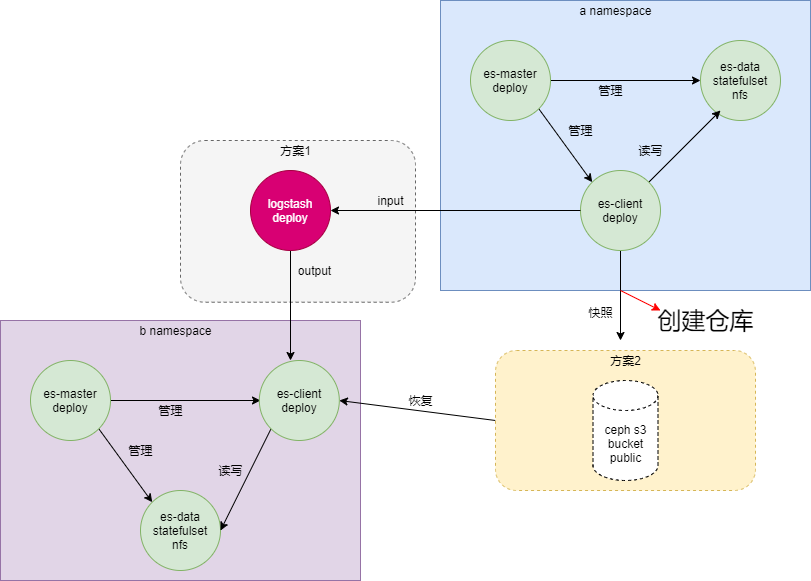
-方案1 : logstash
- 方案2: ceph s3
- s3 操作:https://www.cnblogs.com/sunhongleibibi/p/11661123.html
- 部署资源清单: 链接:https://pan.baidu.com/s/13wxwywdu_9g-Szxy_ugC7w
提取码:anch- PS:链接为部署资源清单和验证方案可编辑图
es 双集群环境
[root@localhost a]# ctl get po -n aNAME READY STATUS RESTARTS AGEelasticsearch-client-7bf748d697-gnrjz 1/1 Running 0 23helasticsearch-data-0 1/1 Running 0 23helasticsearch-master-7569856dd7-z7q4z 1/1 Running 0 23hlogstash-69f7b75f5-vl4k2 1/1 Running 0 23h-------------------------------------------------------------------------------[root@localhost a]# ctl get po -n bNAME READY STATUS RESTARTS AGEelasticsearch-client-84f954845b-4tj2s 1/1 Running 0 2d1helasticsearch-data-0 1/1 Running 0 2d1helasticsearch-master-58b5bf9d-62nfg 1/1 Running 0 2d1h数据节点存储为nfs
go向es插入数据
/** * @Author: anchnet * @Description: * @File: main.go * @Version: 1.0.0 * @Date: 2021/7/2 13:07 */package mainimport ( "bytes" "encoding/json" "flag" "fmt" "github.com/elastic/go-elasticsearch/v8" "io/ioutil" "strconv" "time")func main() { start := time.Now() // 获取当前时间 //支持参数 var ( count int // 起始数 total int // 截至数 index string // index id string // id title string // title ) flag.IntVar(&count, "c", 1, "起始数") flag.IntVar(&total, "e", 1, "截至数") flag.StringVar(&index, "i", "", "index") flag.StringVar(&id, "d", "", "id") flag.StringVar(&title, "t", "", "title") // 解析参数 flag.Parse() if index == "" { index = "demo" } if id == "" { id = "id_1" } if title == "" { title = "安畅" } fmt.Println("count:", count) fmt.Println("total:", total) fmt.Println("index:", index) fmt.Println("id:", id) fmt.Println("title:", title) addresses := []string{"http://192.168.201.113:31001"} config := elasticsearch.Config{ Addresses: addresses, Username: "elastic", Password: "l605eslS0mYOYEB4grNU", CloudID: "", APIKey: "", } // new client es, err := elasticsearch.NewClient(config) if err != nil { fmt.Println(err, "Error creating the client") } //Get(*es, index, id) //Update(*es, index, id) //Get(*es, index, id) create(*es, index, count, total) //Search(*es, index, title) elapsed := time.Since(start) fmt.Println("该函数执行完成耗时:", elapsed)}func create(es elasticsearch.Client, index string, count int, total int) bool { //var wg sync.WaitGroup // Create creates a new document in the index. // Returns a 409 response when a document with a same ID already exists in the index. for i := count; i < total; i++ { //wg.Add(1) k := strconv.Itoa(i) var buf bytes.Buffer content, err := ioutil.ReadFile("./test.log") // just pass the file name if err != nil { fmt.Print(err) } doc := map[string]interface{}{ "title": "安畅是一家怎么样的公司呢?" + k, "content": content, "time": time.Now().Unix(), "date": time.Now(), } if err := json.NewEncoder(&buf).Encode(doc); err != nil { fmt.Println(err, "Error encoding doc") return false } func() { time.Sleep(1 * time.Millisecond) res, err := es.Create(index, "idx_"+k, &buf) if err != nil { fmt.Println(err, "Error create response") } //wg.Done() defer res.Body.Close() fmt.Println(res.String()) }() } //wg.Wait() return true}//go run main.go -c 3 -e 10000方案一验证:
验证向a集群写入数据
# kubectl exec -it elasticsearch-client-7bf748d697-gnrjz -n a -- curl -u elastic:l605eslS0mYOYEB4grNU open demo sOGM8_9UTnuEUyCpLRx6Mg 1 1 10000 0 74.3mb 74.3mb
logstash-cm.yaml
apiVersion: v1kind: ConfigMapmetadata: name: logstash-config namespace: a data: containers.conf: | input { elasticsearch { hosts => ["http://elasticsearch-client.a:9200"] user => "elastic" password => "l605eslS0mYOYEB4grNU" index => "demo" #size => 10000 # scroll => "1m" # codec => "json" #docinfo => true } } #filter { #sleep { #time => "1" #every => 10 #} #} output { elasticsearch { hosts => ["elasticsearch-client.b:9200"] user => "elastic" password => "bcsvxqPxIKIJ5p5e20zZ" index => "demo" document_type => "%{[@metadata][_type]}" document_id => "%{[@metadata][_id]}" } # stdout { codec => rubydebug { metadata => true } } } 验证b集群

PS:在反复验证下 在现有集群环境下,在数据量为74.3M 时,由a es集群向b集群 数据传输的时间大约为3S.
方案二验证:
- 推荐此方案
- 已解决的问题:1、es官方镜像与s3插件的集成 2、bucket的权限问题 3、es配置重载 4、a es集群向s3快照 到b es集群恢复
Dockerfile
es镜像增加s3插件
FROM elasticsearch:7.8.0ADD https://artifacts.elastic.co/downloads/elasticsearch-plugins/repository-s3/repository-s3-7.8.0.zip /usr/share/elasticsearch/RUN yes | elasticsearch-plugin install file:///usr/share/elasticsearch/repository-s3-7.8.0.zip创建s3 bucket
# s3cmd ls | grep zisefeizhu2021-07-06 09:24 s3://zisefeizhu# s3cmd info s3://zisefeizhus3://zisefeizhu/ (bucket): Location: default Payer: BucketOwner Expiration Rule: none Policy: none CORS: none ACL: *anon*: READ ACL: anchnet: FULL_CONTROL URL: # s3cmd setacl s3://zisefeizhu/ --acl-public --recursivees 结合s3
以下操作在a es 集群的每个Pod 上执行
# elasticsearch-keystore add s3.client.default.access_key# elasticsearch-keystore add s3.client.default.secret_key# elasticsearch-keystore listkeystore.seeds3.client.default.access_keys3.client.default.secret_key创建一个S3类型的仓库
# ctl exec -it elasticsearch-client-7bf748d697-gnrjz -n a -- curl -u elastic:l605eslS0mYOYEB4grNU -H 'Content-Type: application/json' -XPUT -d '{ "type": "s3", "settings": { "endpoint": "49.235.65.51:7480", "bucket": "s3://zisefeizhu", "base_path": "/zisefeizhu", "max_snapshot_bytes_per_sec": "200mb", "max_restore_bytes_per_sec": "200mb" }}'!报错:
{"error":{"root_cause":[{"type":"repository_verification_exception","reason":"[s3_obs_repository] path [/zisefeizhu] is not accessible on master node"}],"type":"repository_verification_exception","reason":"[s3_obs_repository] path [/zisefeizhu] is not accessible on master node","caused_by":{"type":"i_o_exception","reason":"Unable to upload object [/zisefeizhu/tests-FLt0bsA2QcCTc_l9JeO78w/master.dat] using a single upload","caused_by":{"type":"sdk_client_exception","reason":"sdk_client_exception: Failed to connect to service endpoint: ","caused_by":{"type":"i_o_exception","reason":"Connect timed out"}}}},"status":500}
PS:master node 无法访问base_path ????
master node 也已经添加了s3的访问权限、且s3的bucket 也已经公开了权限。
es 与ceph s3 关联问题解决
1、es 集群的master节点和data节点 增加 s3的key
2、es配集群重载配置
# kubectl exec -it elasticsearch-client-7bf748d697-gnrjz -n a -- curl -u elastic:l605eslS0mYOYEB4grNU -XPOST id="a集群创建s3类型的快照仓库">a集群创建S3类型的快照仓库# ctl exec -it elasticsearch-client-7bf748d697-gnrjz -n a -- curl -u elastic:l605eslS0mYOYEB4grNU -H 'Content-Type: application/json' -XPUT -d ' { "type": "s3", "settings": { "endpoint": "http://49.235.65.51:7480", "bucket": "zisefeizhu", "base_path": "/zisefeizhu", "max_snapshot_bytes_per_sec": "200mb", "max_restore_bytes_per_sec": "200mb" }}'## 成功会返回: {"acknowledged":true} ## 查看# ctl exec -it elasticsearch-client-7bf748d697-gnrjz -n a -- curl -u elastic:l605eslS0mYOYEB4grNU -XGET 删除# ctl exec -it elasticsearch-client-7bf748d697-gnrjz -n a -- curl -u elastic:l605eslS0mYOYEB4grNU -XDELETE id="a集群创建快照">a集群创建快照# ctl exec -it elasticsearch-client-7bf748d697-gnrjz -n a -- curl -u elastic:l605eslS0mYOYEB4grNU -H 'Content-Type: application/json' -XPUT -d '{ "indices": "demo", "ignore_unavailable": true, "include_global_state": false}'## s3 查看快照大小# s3cmd du -H s3://zisefeizhu 74M 41 objects s3://zisefeizhu/ #和demo 索引大小一致 ## 查看仓库下的所有快照# ctl exec -it elasticsearch-client-7bf748d697-gnrjz -n a -- curl -u elastic:l605eslS0mYOYEB4grNU -XGET 查看 snapshot_zisefeizhu 快照的概要状态# ctl exec -it elasticsearch-client-7bf748d697-gnrjz -n a -- curl -u elastic:l605eslS0mYOYEB4grNU -XGET 查看 snapshot_zisefeizhu 快照的详细状态# ctl exec -it elasticsearch-client-7bf748d697-gnrjz -n a -- curl -u elastic:l605eslS0mYOYEB4grNU -XGET 删除快照# ctl exec -it elasticsearch-client-7bf748d697-gnrjz -n a -- curl -u elastic:l605eslS0mYOYEB4grNU -XDELETE true 在创建快照的过程中会忽略快照请求中不存在的索引。ignore_unavailable 的默认值为false,即如果要做快照的索引不存在,快照请求就会失败。 include_global_state false 能够防止集群的全局状态被作为快照的一部分存储起来。 include_global_state的默认值为true partial默认值是false,如果快照中的一个或多个主分片不是可用状态,集群会等待直到主分片全部可用才开始做快照。 通过设置 partial 为 true 可以忽略主分片全部可用检查直接做快照。 b集群增加s3 key
# ctl get po -n bNAME READY STATUS RESTARTS AGEelasticsearch-client-7bf748d697-tfh26 1/1 Running 0 4m7selasticsearch-data-0 1/1 Running 0 4m12selasticsearch-master-7569856dd7-828hp 1/1 Running 0 4m13s# ctl exec -it elasticsearch-client-7bf748d697-tfh26 -n b -- bash[root@elasticsearch-client-7bf748d697-tfh26 elasticsearch]# elasticsearch-plugin listrepository-s3[root@elasticsearch-client-7bf748d697-tfh26 elasticsearch]# elasticsearch-keystore listkeystore.seed[root@elasticsearch-client-7bf748d697-tfh26 elasticsearch]# elasticsearch-keystore add s3.client.default.access_keyEnter value for s3.client.default.access_key: [root@elasticsearch-client-7bf748d697-tfh26 elasticsearch]......原文转载:http://www.shaoqun.com/a/881608.html
跨境电商:https://www.ikjzd.com/
捷汇:https://www.ikjzd.com/w/419
欧苏丹:https://www.ikjzd.com/w/1756
indiegogo:https://www.ikjzd.com/w/265
前言加入新公司的第二个星期的星期二遇到另一个项目需要技术性支持:验证es多集群的数据备份方案,需要我参与验证,在这个项目中需要关注到两个集群的互通性。es集群是部署在不同的k8s环境中,K8s环境未必可以互相通信。在这个过程中也遇到很多问题,关关难过关关过。因为是新入职的公司的第一个完成的任务,特记录如下环境k8s版本:1.18.3es版本:7.8logstash版本:7.8ceph:s3验证方案
2021年元旦旅游景点大全:http://www.30bags.com/a/430684.html
2021年元旦旅游图片 元旦新年最美景点图片介绍:http://www.30bags.com/a/424836.html
2021年元旦起执行出租车新规定:http://www.30bags.com/a/430876.html
2021年元旦去海南旅游有什么好玩的?:http://www.30bags.com/a/401022.html
我高潮了男友不停继续弄 男友说我水多爽死他了:http://lady.shaoqun.com/a/247851.html
极品的一家人让我很讨厌:http://lady.shaoqun.com/a/123610.html
在教室深深挺进同桌花蕊里 脱下漂亮班花校裙按着臀强行干:http://lady.shaoqun.com/m/a/246826.html
他JJ又粗又长的查插我 姐夫,嗯啊,痛,慢点插:http://www.30bags.com/m/a/249503.html
做好独立站推广,下辈子不愁!:https://www.ikjzd.com/articles/146687
关于亚马逊中东站自发货政策的调整和有效追踪率:https://www.ikjzd.com/articles/146680
杭州男人和盲女在车上发生关系,4天后分手,原因很奇妙:http://lady.shaoqun.com/a/423209.html
健康才是性生活开始的基础 女性新婚夜要注意的5个问题 :http://lady.shaoqun.com/a/423210.html

No comments:
Post a Comment